PG Software

See how PG Junction helps PG admins manage properties, tenants, and payments from one place.

Admin

Admin Dashboard with Search & Quick Actions

The dashboard gives PG admins a fast control center to search tenants and run daily operations. Key cards and quick buttons help complete payment and tenant tasks in one place.

  • Search Tenant lets admins quickly find tenants by name, email, mobile, or room number.
  • Quick action buttons include Add Rent Payment, Add AC Payment, Add Expense, Add Security Deposit, and Add Tenant.
  • In the same dashboard, admins can also view Financial Metrics cards and Recent Inquiries for fast follow-up.
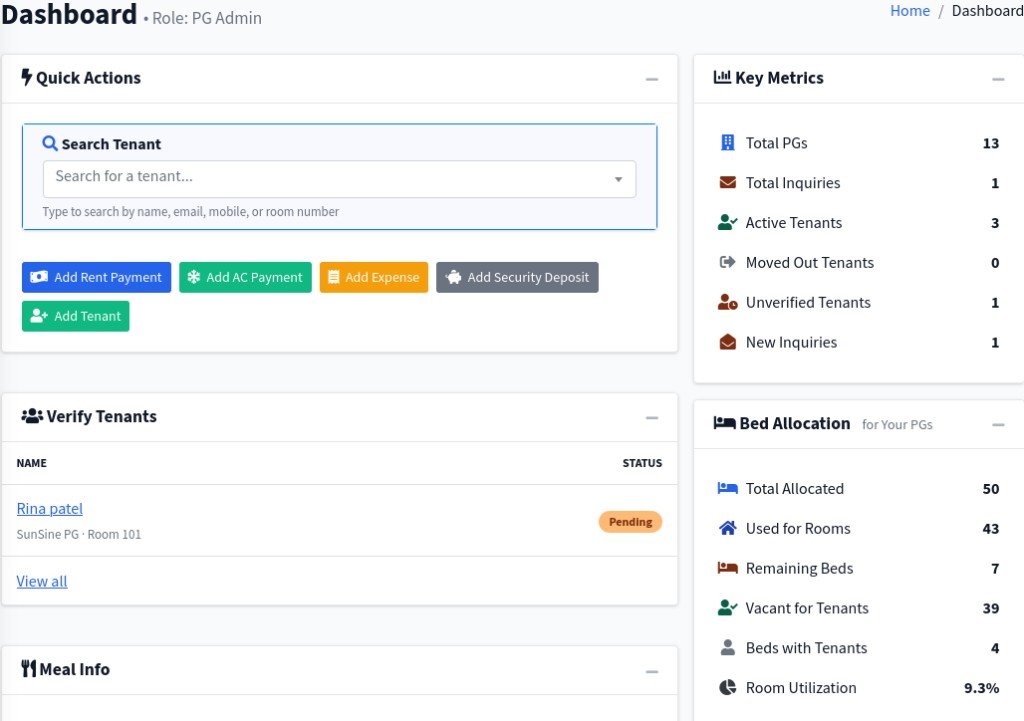
PG Junction dashboard with Search Tenant and quick action buttons
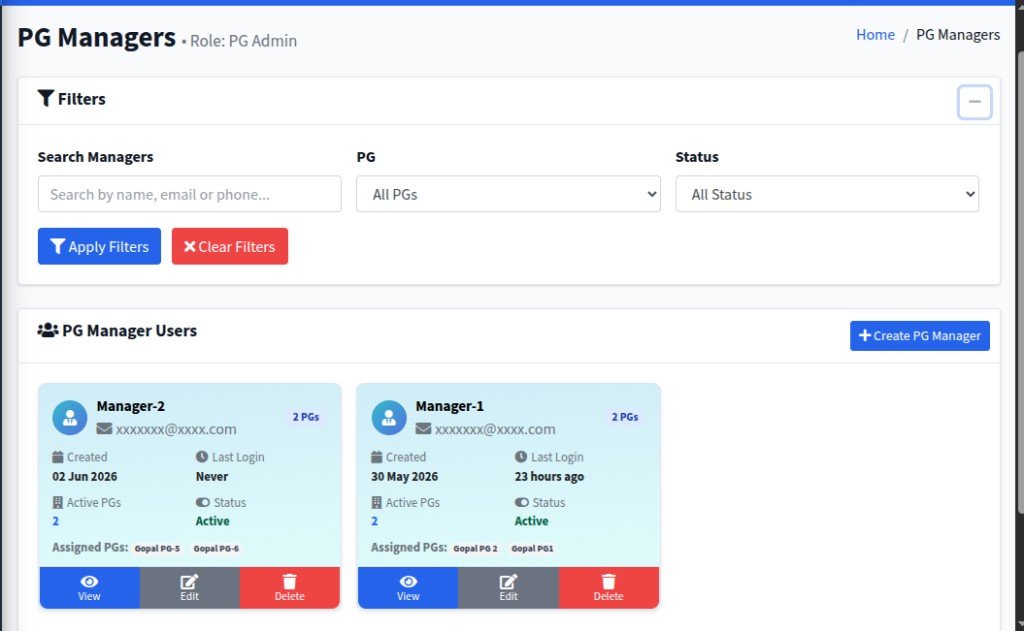
PG Junction PG Managers screen – filters, manager list, and assigned PGs
Admin

Create & Manage PG Managers

Delegate day-to-day operations by creating PG Manager accounts and assigning them to specific properties. Search, filter, and manage your manager team from one screen.

  • Search by name, email, or phone and filter by PG and Status to find managers quickly.
  • Add managers with + Create PG Manager and view creation date, last login, active PGs, and assigned properties on each card.
  • Use View, Edit, or Delete on each manager card to maintain your team.
Admin

Manage Tenants

Keep every resident organized with powerful filters and at-a-glance tenant cards. Search, filter, and manage check-ins, rent, security deposits, and payment status from one screen.

  • Filter by name, mobile, PG, room, status, gender, and check-in date range.
  • Each tenant card shows room & bed, check-in date, security deposit, rent, and payment status.
  • Add new tenants or Export your list for reporting and offline records.
PG Junction Tenants screen – filters and tenant cards with rent and payment status
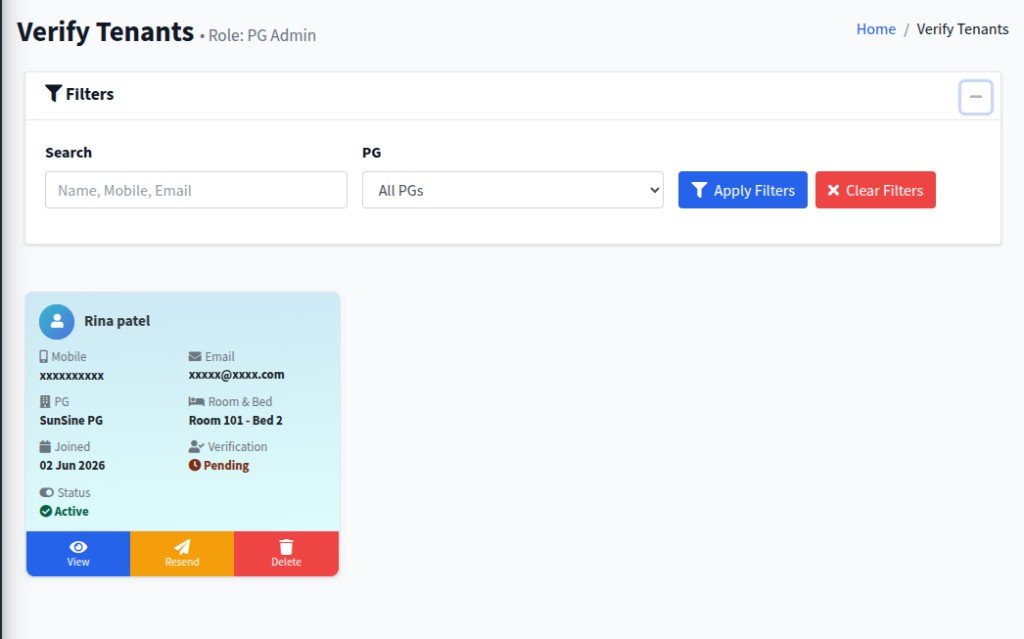
PG Junction Verify Tenants screen – pending verification and tenant details
Admin

Verify Tenants

Review and approve tenant registrations before they are fully onboarded. See contact details, assigned PG, room & bed, join date, and verification status in one place.

  • Filter tenant records and track Pending vs verified status at a glance.
  • View mobile, email, PG assignment, room & bed, and active status on each tenant card.
  • Use View, Resend verification, or Delete actions to manage the approval workflow.
Admin

Meals Management

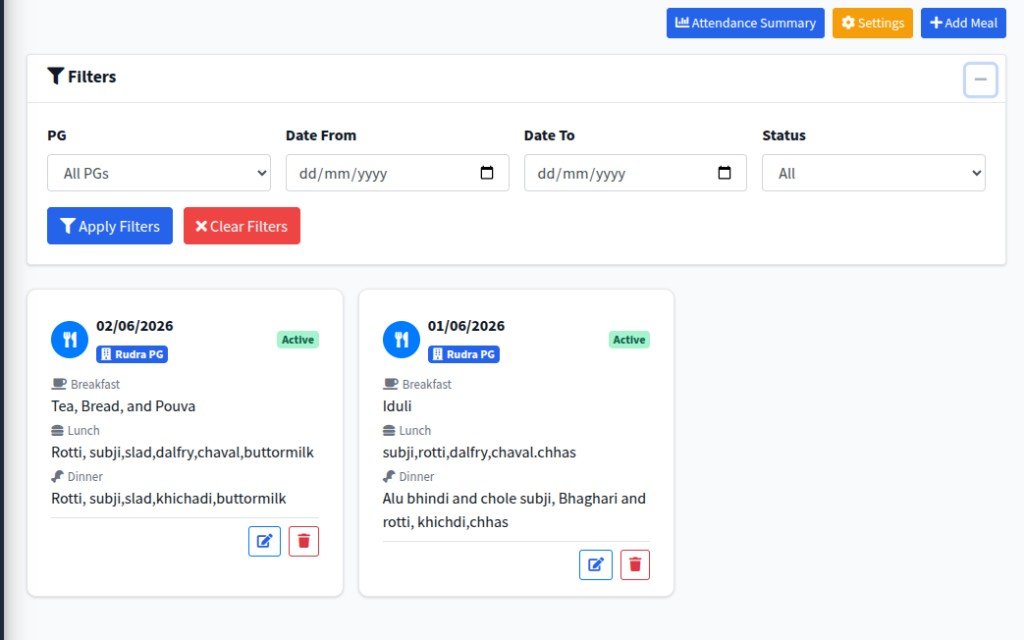
Plan and publish daily menus for breakfast, lunch, and dinner across your PG properties. Tenants see what is served each day, and you stay organized with date-wise meal cards.

  • Create menus with + Add Meal and schedule breakfast, lunch, and dinner items per date.
  • Filter by PG, date range, and status, then view meal cards with active status and edit or delete as needed.
  • Use Attendance Summary and Settings to track meal uptake and configure meal options.
PG Junction Meals screen – daily breakfast, lunch, and dinner menus by date and PG
PG Junction Meal Attendance Summary – tenant meal attendance stats and detailed list
Admin

Meal Attendance Summary

Track who is eating breakfast, lunch, and dinner each day so you can plan portions and costs accurately. Filter by date and PG, then review summary stats and a per-tenant breakdown.

  • Summary cards show total tenants and attendance counts with percentages for each meal.
  • Filter by Date and PG to focus on a specific day or property.
  • Detailed list shows each tenant’s breakfast, lunch, and dinner status plus total attending for the day.
Admin

Meal Timing Settings

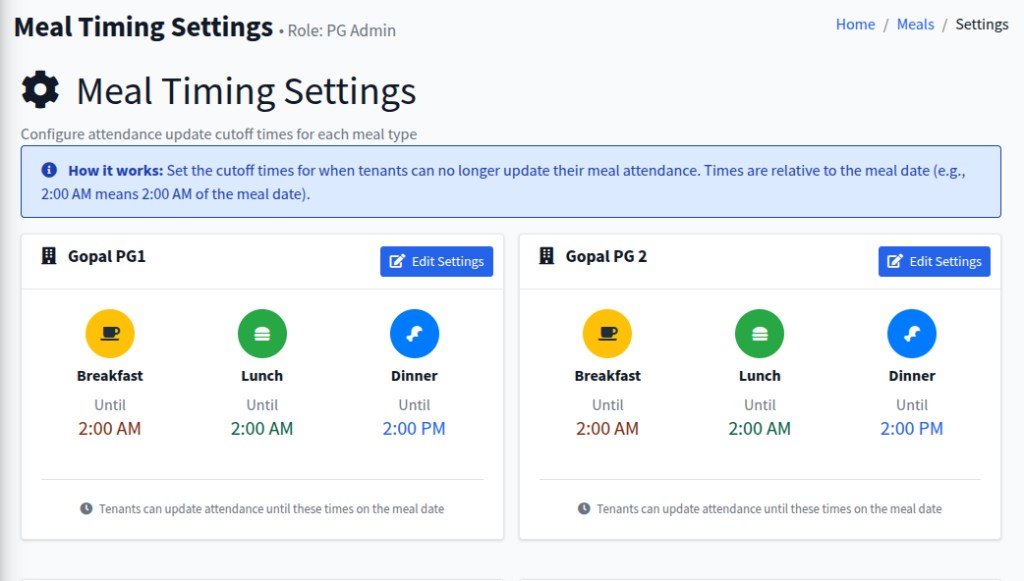
Configure meal attendance cutoff times for each PG so tenants know exactly when updates close. This helps kitchen planning stay accurate and consistent across breakfast, lunch, and dinner.

  • Set separate cutoff times for Breakfast, Lunch, and Dinner.
  • Manage settings PG-wise with quick Edit Settings action on each PG card.
  • Clear “How it works” guidance makes attendance rules easy for admins and tenants to follow.
PG Junction Meal Timing Settings – cutoff times for breakfast lunch and dinner by PG
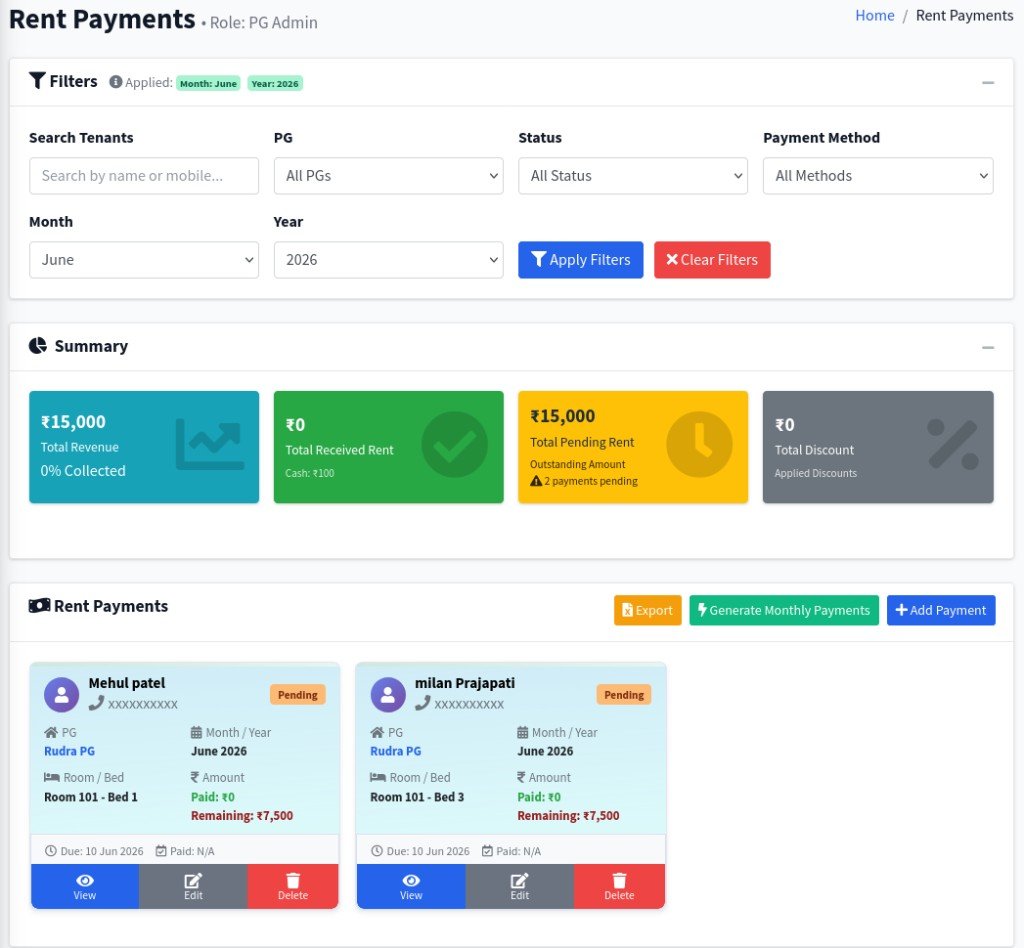
PG Junction Rent Payments – filters, payment summary cards, and tenant rent cards
Admin

Rent Payments Management

Track monthly rent collections with clear filters, summary cards, and tenant-wise payment records. Review pending amounts quickly and take actions from one screen.

  • Filter by tenant, PG, status, payment method, month, and year for faster rent tracking.
  • Summary cards show total revenue, received rent, pending rent, and discounts in real time.
  • Use Export, Generate Monthly Payments, and + Add Payment to manage billing operations.
Admin

Generate Monthly Payments

Quickly create monthly rent payment records for all active tenants in a selected PG. This saves manual work and ensures no tenant is missed in recurring billing.

  • Select PG, payment month, year, and due date from one guided popup form.
  • System skips already-generated records for the same month to prevent duplicate billing.
  • Use Generate Payments for bulk creation, while still keeping Add Payment for individual entries.
PG Junction Generate Monthly Payments modal with PG selection, month, year, and due date
PG Junction AC Payments screen with filters, summary, and room-wise tenant balances
Admin

AC Payments Management

Manage AC billing with room-level visibility, tenant balances, and quick payment actions. Filters and summary cards make it easy to monitor collected amounts and pending dues.

  • Filter AC dues by PG, room, month, and year to focus on the right billing period.
  • Track key metrics in summary cards: collected payments, discounts, current month cash/online, and pending dues.
  • Use Generate AC Bill, + Add Payment, and tenant-wise History for complete AC payment control.
Admin

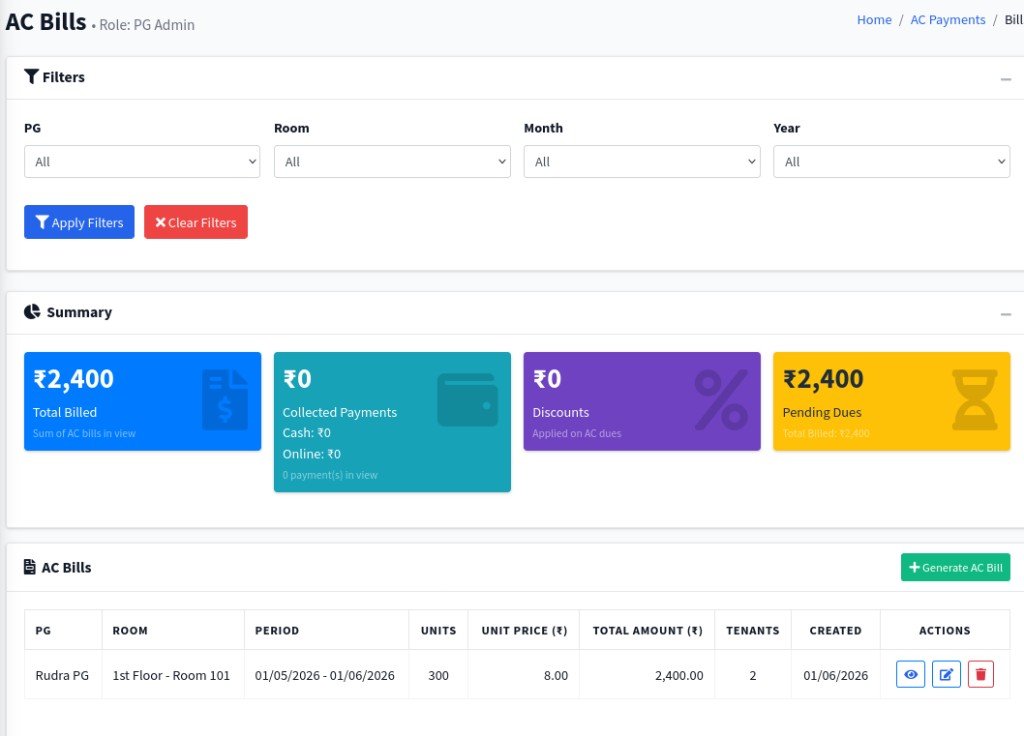
AC Bills & Generate AC Bill

Create and manage AC bills with clear period-wise billing details for each room. Review totals, collections, and pending amounts, then generate fresh AC bills in one click.

  • Filter AC bills by PG, room, month, and year to quickly find the required billing records.
  • Summary cards show total billed, collected payments, discounts, and pending dues for fast monitoring.
  • Use + Generate AC Bill and row-level actions (view, edit, delete) to complete the AC billing workflow.
PG Junction AC Bills screen with filters, billing summary, and generate AC bill action
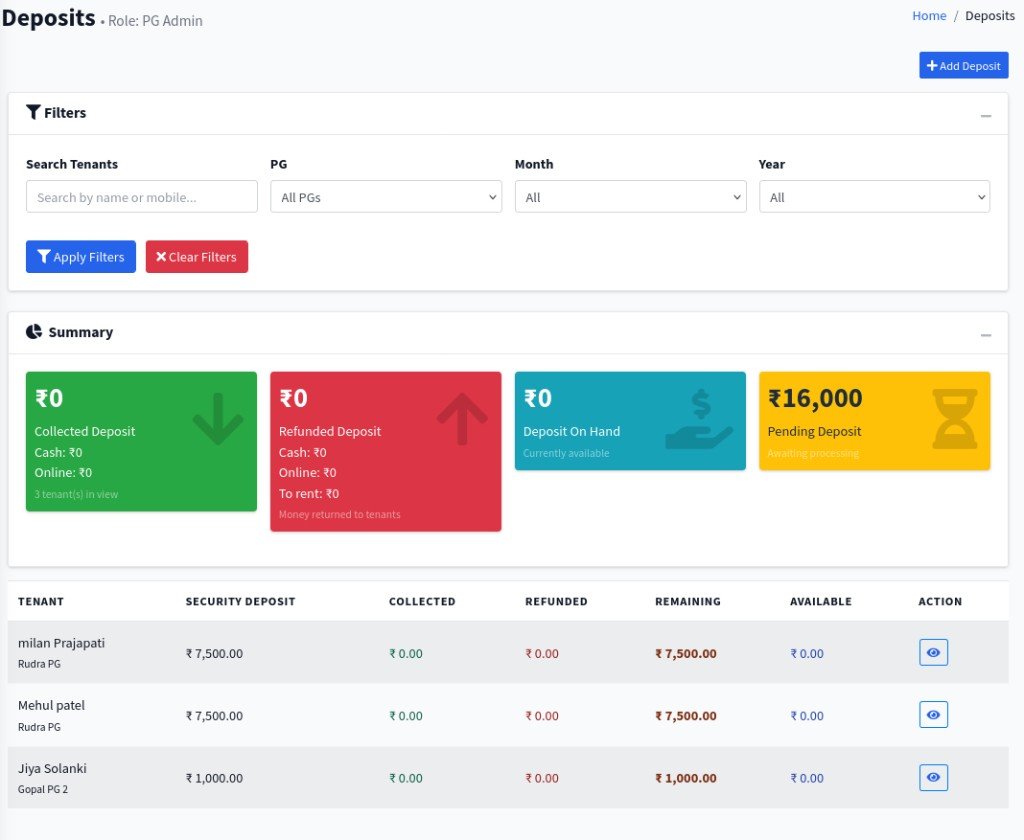
PG Junction Deposits screen with filters, summary cards, and tenant deposit table
Admin

Deposits Management

Track tenant security deposits with full visibility into collected, refunded, available, and pending amounts. Use filters and summary cards to monitor deposit status across PGs.

  • Filter deposits by tenant, PG, month, and year for faster search.
  • Summary cards show collected deposit, refunded deposit, deposit on hand, and pending deposit.
  • Use + Add Deposit and per-tenant actions to maintain accurate security deposit records.
Admin

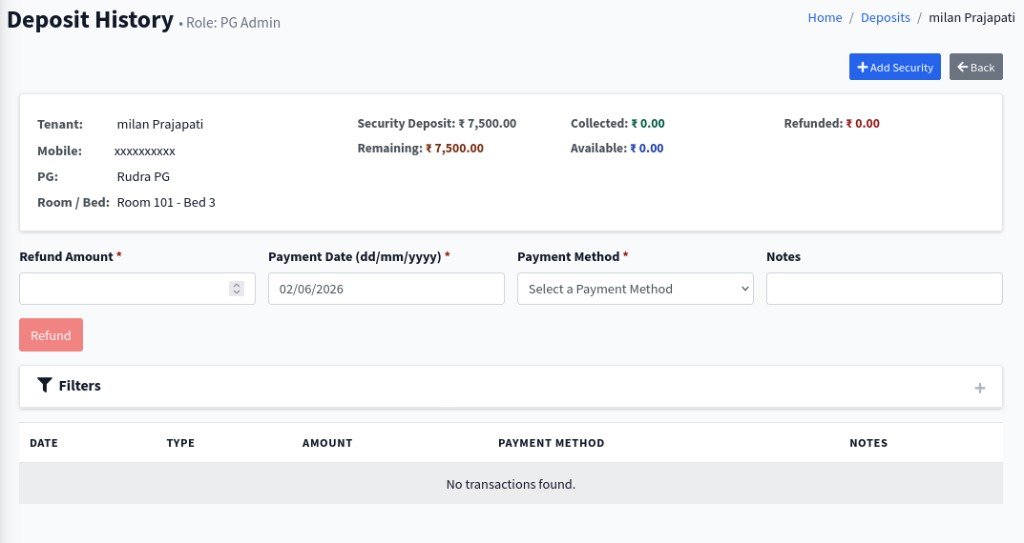
Deposit History & Add Security

Open each tenant’s deposit history to add new security entries, process refunds, and review transaction logs. This gives a complete timeline for every deposit movement.

  • View tenant-level details: security deposit, collected, refunded, remaining, and available balances.
  • Add security amounts and record refunds with payment date, method, and notes.
  • Track deposit transaction history in one place for clear audit and reconciliation.
PG Junction Deposit History screen with add security and refund transaction form
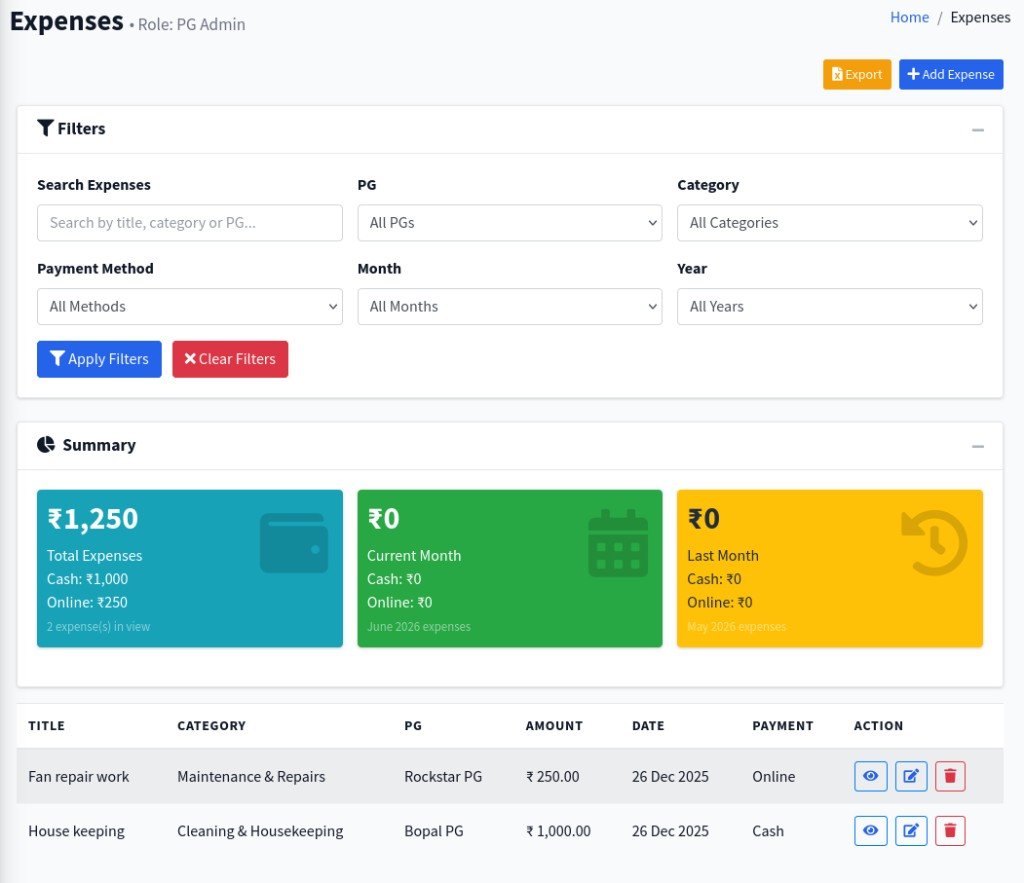
PG Junction Expenses screen with filters, summary cards, and expense list
Admin

Expenses Management

Track all operational expenses with smart filters, monthly summaries, and an easy action table. This helps admins control spending PG-wise and category-wise.

  • Filter by search text, PG, category, payment method, month, and year for quick analysis.
  • Summary cards show total expenses and month-wise cash/online split for clear financial tracking.
  • Use Export, + Add Expense, and row actions (view, edit, delete) for complete expense control.
Admin

Expense Details & Receipt View

Open any expense to see full information and receipt status in one detail view. This improves transparency and makes expense verification easier for admins.

  • View complete expense metadata: title, amount, PG, category, method, date, creator, and timestamps.
  • Receipt panel shows uploaded proof (or missing receipt status) for each expense entry.
  • Quick actions let you Edit Expense or Delete Expense directly from the details screen.
PG Junction Expense Details screen with receipt panel and quick actions
PG Junction Inquiries screen with filters and inquiry cards
Admin

Inquiries & Inquiry Details

Capture user inquiries from frontend PG pages and manage them in one admin panel. Quickly filter leads, open inquiry details, and follow up with potential tenants.

  • User inquiries submitted on the frontend PG listing/details pages are mapped to the selected PG.
  • Use filters for search, status, and PG to find new and pending inquiries faster.
  • Open View to see full inquiry details and remove irrelevant records with Delete.
Admin

Complaint Management & Details

Tenant complaints submitted after tenant login are displayed to PG admins for quick action. Admins can filter, prioritize, and open detailed complaint views to resolve issues efficiently.

  • Tenant-raised complaints are visible to the related PG admin with complaint ID, tenant, room, and PG mapping.
  • Use filters for PG, status, priority, and search to track pending, in-progress, and urgent complaints.
  • Click View Details to open complaint detail, review full description, and process resolution updates.
PG Junction Complaint Management screen with filters, summary, and complaint card
PG Junction Activities screen showing recent activity and notifications
Admin

Activities & Notifications

Track important system updates in one place with the recent activity timeline. Notifications for events like complaints, inquiries, tenants, payments, and PG updates are displayed for admin visibility.

  • Search and filter activities by entity to quickly find relevant operational events.
  • Recent activity table shows title, details, entity type, and time for each notification entry.
  • Critical updates like complaint submissions, new inquiries, and bill generation appear as trackable activity notifications.
Admin

Reports Dashboard & Module Reports

The reports page gives a full business summary with chart-based insights and module-wise report cards. Admins can open or export each particular report directly from one dashboard.

  • Top summary and monthly profit graph show PG count, active tenants, rent collection, and expense trend.
  • Particular report blocks include Overall, Deposit, Rent Payments, Expenses, Tenants, Room/Bed, and Inquiry reports.
  • Each module supports quick actions like View Report and Export Report for decision-making and sharing.
PG Junction reports dashboard with monthly chart and module-wise report cards
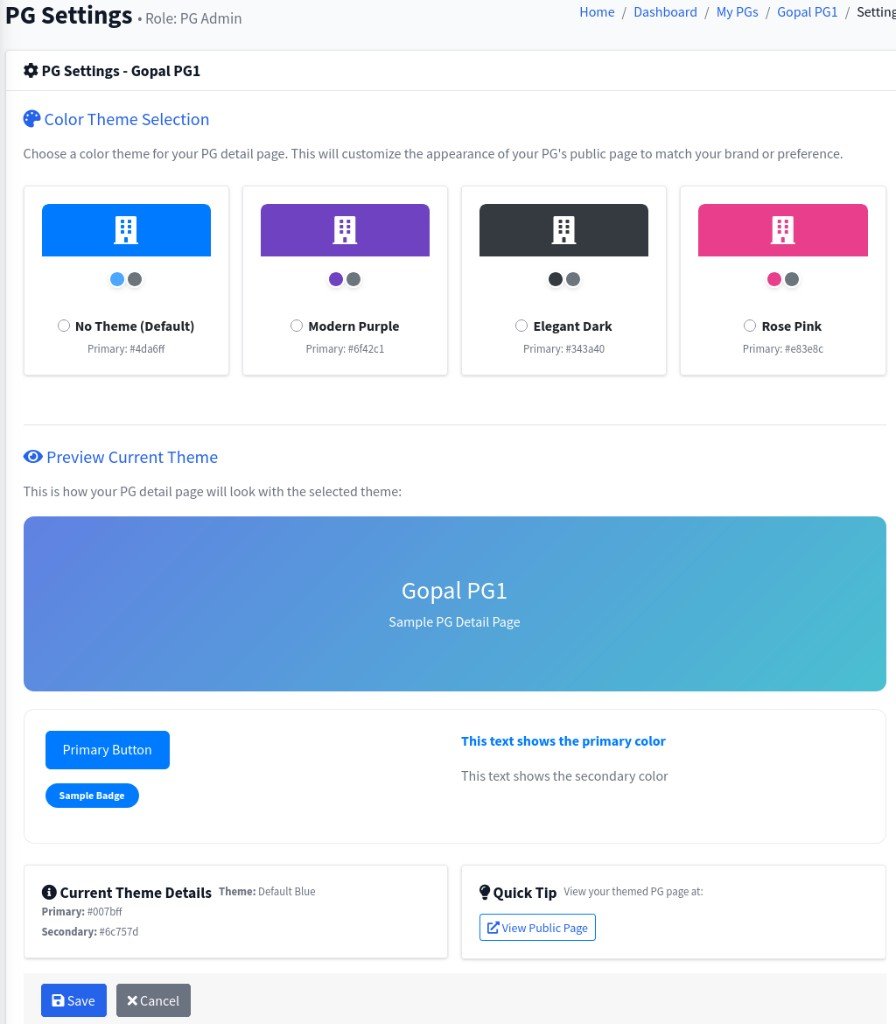
PG Junction PG Settings screen for selecting and previewing PG page themes
Admin

PG Settings & Theme Changes

Customize each particular PG’s public page style from the PG Settings panel. Admins can select a theme, preview design changes instantly, and save the look per PG.

  • Choose from multiple theme options (default, purple, dark, pink) for each PG profile page.
  • Live preview shows header, button, badge, and text colors before saving changes.
  • Current theme details and View Public Page help verify how the selected theme appears to users.
Tenant

Tenant Login Dashboard

After tenant login, users get a personal dashboard with meal attendance, dues, and support status. This page helps tenants manage daily updates and track important payment information from one place.

  • Welcome panel shows tenant profile details, PG name, room/bed, and check-in date.
  • Meal Attendance section lets tenants mark Coming/Not Coming for breakfast, lunch, and dinner by date.
  • Quick cards display Rent Due, AC Bill Due, Deposit, and Support Complaint status for fast action.
PG Junction tenant dashboard after login showing meal attendance and dues
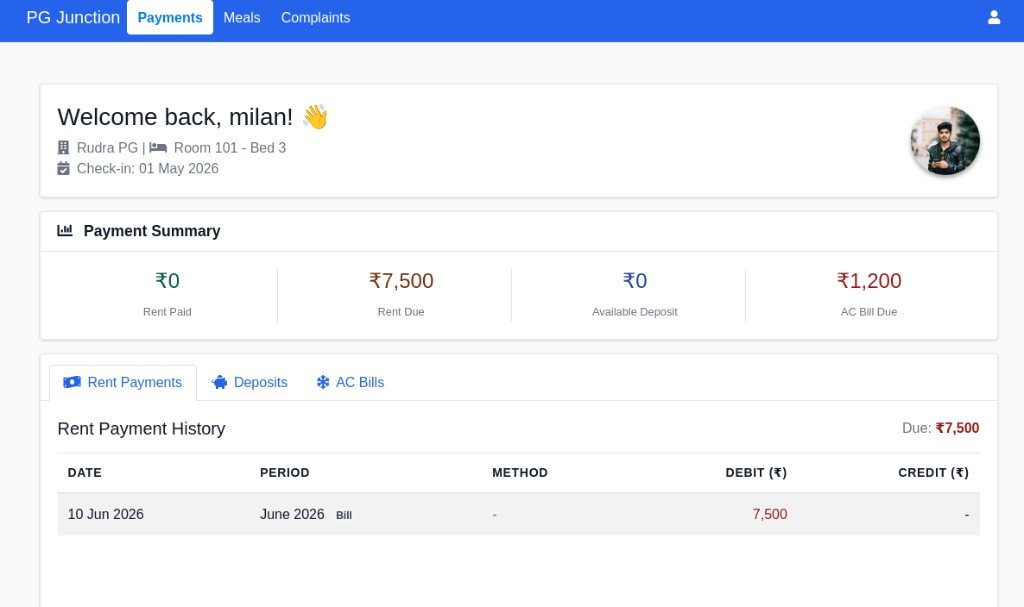
PG Junction tenant payments dashboard with rent payments deposits and AC bills tabs
Tenant

Tenant Payment Dashboard

After tenant login, the Payments page provides a complete payment summary and transaction history. Tenants can check rent, deposits, and AC bill records from one organized dashboard.

  • Payment Summary cards show Rent Paid, Rent Due, Available Deposit, and AC Bill Due.
  • Tabbed view includes Rent Payments, Deposits, and AC Bills for clear record separation.
  • Transaction history table displays date, billing period, payment method, debit/credit amounts, and current due balance.
Tenant

Tenant Meals Menu & Attendance

After tenant login, the Meals page shows the daily menu and lets tenants update attendance meal-wise. Cutoff notices and date navigation help tenants submit meal choices on time.

  • Meal menu displays breakfast, lunch, and dinner items for the selected date.
  • Attendance toggles allow tenants to mark Coming or Not Coming for each meal.
  • Update deadlines are shown clearly with meal-wise cutoff times, plus previous/next date controls.
PG Junction tenant meals page with menu, attendance toggles, and cutoff times
PG Junction tenant complaints page with complaint metrics, filters, and complaint list
Tenant

Tenant Complaints Management

After tenant login, users can submit complaints and track complaint progress in real time. Status metrics and filters help tenants monitor pending, in-progress, and resolved issues.

  • + Submit Complaint allows tenants to create new service/support complaints quickly.
  • Key metric cards show total complaints with status counts (Pending, In Progress, Resolved).
  • Complaint cards support View Details, Edit, and Delete with status and priority tracking.